

NICNT File Extension
Native Instruments KONTAKT Library
-
DeveloperNative Instruments, Inc.
-
Category
-
Popularity3.8 (8 votes)
What is NICNT file?
Files with .NICNT extension store information about audio data libraries for Native Instruments KONTAKT software version 5. TKONTAKT is a software (or virtual) sampler most often offering more features than hardware samplers. NICNT libraries can hold various audio samples for creating electronic music. KONTAKT is a commercial software dedicated to professionals, offering a modular structure, efficient audio engine and support for advanced audio technologies. Access to rich audio library is provided upon purchasing KONTAKT. Additionally, new samples can be added via imports and user gain access to free KONTAKT Player.
Uses of NICNT files in KONTAKT
NICNT files are copyright-protected and to used such file libraries the same version of KONTAKT (or newer) as the version on which the library was created must be used. KONTAKT is not backward compatible and does not support custom libraries. Importing custom files required extra steps and may be considered a copyright infringement.
Programs which support NICNT file extension
Programs that can handle NICNT files are as follows. Files with NICNT extension, just like any other file formats, can be found on any operating system. The files in question may be transferred to other devices, be it mobile or stationary, yet not all systems may be capable of properly handling such files.
 Windows
Updated: 04/06/2023
How to open file with NICNT extension?
Problems with accessing NICNT may be due to various reasons. What is important, all common issues related to files with NICNT extension can be resolved by the users themselves. The process is quick and doesn’t involve an IT expert. The following is a list of guidelines that will help you identify and solve file-related problems.
Step 1. Get the KONTAKT
 The main and most frequent cause precluding users form opening NICNT files is that no program that can handle NICNT files is installed on user’s system. The solution to this problem is very simple. Download KONTAKT and install it on your device. Above you will find a complete listing of programs that support NICNT files, classified according to system platforms for which they are available. The safest method of downloading KONTAKT installed is by going to developer’s website (Native Instruments, Inc.) and downloading the software using provided links.
Step 2. Check the version of KONTAKT and update if needed
 You still cannot access NICNT files although KONTAKT is installed on your system? Make sure that the software is up to date. Sometimes software developers introduce new formats in place of that already supports along with newer versions of their applications. If you have an older version of KONTAKT installed, it may not support NICNT format. The most recent version of KONTAKT is backward compatible and can handle file formats supported by older versions of the software.
Step 3. Associate Native Instruments KONTAKT Library files with KONTAKT
If the issue has not been solved in the previous step, you should associate NICNT files with latest version of KONTAKT you have installed on your device. The process of associating file formats with default application may differ in details depending on platform, but the basic procedure is very similar.
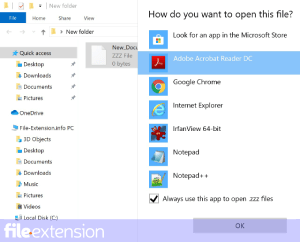
Change the default application in Windows
- Clicking the NICNT with right mouse button will bring a menu from which you should select the option
- Click and then select option
- Finally select , point to the folder where KONTAKT is installed, check the Always use this app to open NICNT files box and conform your selection by clicking button
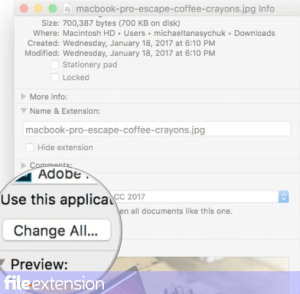
Change the default application in Mac OS
- From the drop-down menu, accessed by clicking the file with NICNT extension, select
- Open the section by clicking its name
- Select KONTAKT and click
- If you followed the previous steps a message should appear: This change will be applied to all files with NICNT extension. Next, click the button to finalize the process.
Step 4. Ensure that the NICNT file is complete and free of errors
Should the problem still occur after following steps 1-3, check if the NICNT file is valid. Being unable to access the file can be related to various issues.
1. The NICNT may be infected with malware – make sure to scan it with an antivirus tool.
If the file is infected, the malware that resides in the NICNT file hinders attempts to open it. It is advised to scan the system for viruses and malware as soon as possible or use an online antivirus scanner. If the scanner detected that the NICNT file is unsafe, proceed as instructed by the antivirus program to neutralize the threat.
2. Ensure the file with NICNT extension is complete and error-free
Did you receive the NICNT file in question from a different person? Ask him/her to send it one more time. It is possible that the file has not been properly copied to a data storage and is incomplete and therefore cannot be opened. When downloading the file with NICNT extension from the internet an error may occurred resulting in incomplete file. Try downloading the file again.
3. Check if the user that you are logged as has administrative privileges.
Sometimes in order to access files user need to have administrative privileges. Log in using an administrative account and see If this solves the problem.
4. Verify that your device fulfills the requirements to be able to open KONTAKT
The operating systems may note enough free resources to run the application that support NICNT files. Close all running programs and try opening the NICNT file.
5. Verify that your operating system and drivers are up to date
Latest versions of programs and drivers may help you solve problems with Native Instruments KONTAKT Library files and ensure security of your device and operating system. Outdated drivers or software may have caused the inability to use a peripheral device needed to handle NICNT files.
Do you want to help?
If you have additional information about the NICNT file, we will be grateful if you share it with our users. To do this, use the form here and send us your information on NICNT file.
File Extension of the day

Files stored in the SQLITE format are data base files created with the SQLite libraries – a system for capturing and managing data bases. Dat...